
Operating Instructions


125
14 POI Loader
14.1 Installing POI Loader
POI Loader allows you to import additional POI (Point of Interest) data to an SD
card for the MioMap program to use. When MioMap starts, it will load the POI
data from the SD card and show the additional locations in the
My POI category of
the
POI function. (See MioMap manual for information on POIs.)
1. Turn on your computer and insert the supplied CD/DVD into the
CD/DVD-ROM drive of your computer.
2. When the language selecting screen appears, click the language that you wish
to install from.
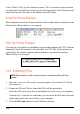
3. Click
Install POI Loader.
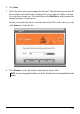
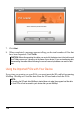
4. Click
Next. Follow the onscreen instructions to complete the installation.
14.2 Preparing the Source Files
The source files can be .xls or .csv files. The file must contain the following data:
z Longitude
z Latitude
z Name
The “Longitude” and “Latitude” fields are numerical values of the WGS84
system. The letter N/S/E/W before the value indicates the hemisphere
North/South/East/West. If the letters are omitted, the program will simply match
the values to your location of hemisphere (where you purchased your device).