
Operating Instructions
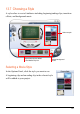
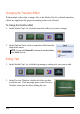
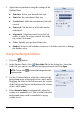


126
In the “Name” field, give the location a name. If it is a location of speed camera,
use the format Name@Speed, where Speed is the speed limit. Note that the unit of
speed limit must be the same as the default unit of MioMap.
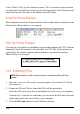
Excel File Format Example
Enter longitude in the first column, latitude in the second column, and name in the
third column. Shown below is an example.
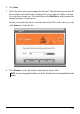
CSV File Format Example
You can use a text editor or spreadsheet program that supports the CSV (Comma
Separated Value) file format to enter the data. In a CSV file, fields/columns are
separated by the comma character and records/rows separated by newlines.
Shown below is an example.
14.3 Importing POIs
NOTE: When importing .xls files, make sure that your computer has Microsoft Excel
installed.
1. Have the .xls or .csv files ready on your computer. (See section 14.2 for the
file structure.)
2. Prepare an SD card. This is where the POIs will be imported to.
Insert the SD card to your device and connect your device to your computer.
Alternatively, if you have a card reader, you can insert the SD card to the card
reader and connect the card reader to your computer.
3. Click the
POI Loader shortcut on the Windows desktop.