
Operating Instructions


11
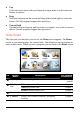
z Tap
Touch the screen once with your fingertip to open items or select onscreen
buttons or options.
z Drag
Hold your fingertip on the screen and drag up/down/left/right or across the
screen. (Not all programs support this operation.)
z Tap and hold
Tap and hold your fingertip until an action is complete, or a result or menu is
shown. (Not all programs support this operation.)
Home Screen
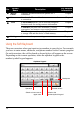
The first time you initialize your device, the Home screen appears. The Home
screen is your starting place for various tasks. Tap a button to start a program or
open another menu. When you exit a program, you are back to the Home screen.
No.
Button
Name
Description
For Detailed
Information
n
MioMap Starts the navigation software. See the MioMap
manual
Videos plays video files. Chapter 2
Audio plays audio files. Chapter 3
o
MioPlayer
Pro
Pictures displays picture files. Chapter 4
p
Camera Take photos or record videos. Chapter 5
q
Contacts Keeps a list of names, addresses, and phone
numbers.
Chapter 6
n o p q
r s t u