
Operating Instructions
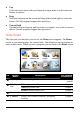


12
No.
Button
Name
Description
For Detailed
Information
r
Mobile
Phone
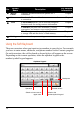
Searches for Bluetooth mobile phones for a
connection.
Chapter 7
s
Stereo Searches for Bluetooth headsets or car stereos for
a connection.
Chapter 7
Card Scanner allows you to scan and recognize
business cards for storing contacts information.
Chapter 8
Calculator provides basic arithmetic, currency
conversion, and measure conversion functions.
Chapter 9
t
Tools
File Manager transfers multimedia files between
a storage card and the device’s flash memory.
Chapter 10
u
Settings Customizes the system settings. Chapter 11
Using the Soft Keyboard
There are occasions when you input text or numbers to your device. For example,
you have to enter names, addresses, and phone numbers in the Contacts program.
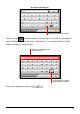
On such occasions, the soft keyboard as shown below will appear on the screen.
Depending on the current operation, either the alphabet keypad or the
number/symbol keypad appears.
Alphabet Keypad
Backspace
Enable umlaut.
Switch to the
number/symbol keypad.
Spaceba
r
Switch to lower case o
r
upper case.