
Operating Instructions


20
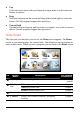
The control panel appears on the screen where you can easily control the player by
tapping the control buttons.
To exit the program, tap
.
3.2 Preparing the Audio Files for Your Device
Before using the program, have the files (.mp3, .wav, or .wma) ready on either
your device’s My Flash Disk\My Audio folder or on a storage card.
A tool called MioTransfer is supplied for you to easily copy the files from your
computer to the correct location. (See section 12.3 for information.)