
Operating Instructions



27
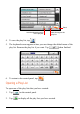
Tap to save your selection and return to the control panel.
To select the Default profile, tap
.
3.8 Settings
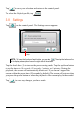
Tap on the control panel. The Settings screen appears.
NOTE: To know the function of each button, you can tap
. Then tap the button on the
list to display a description line on the right side of the screen.
Tap the check box (√) to turn on the power saving mode. Tap the up/down button
to set the timer to 10 seconds, 30 seconds, 1 minute, or 5 minutes. During the
playback, the screen will automatically blank out f if you haven’t tapped the
screen within the preset time (30 seconds by default).The screen will restore when
you press the power button or when the playback of the current play list has ended.
Tap
to save any changes you have made.
Help