
Operating Instructions



32
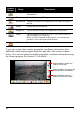
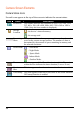
Control
Button
Name Description
Slideshow Starts the slideshow. (See section 4.6 for detailed
information.)
Rotate
Rotate clockwise by 90 degrees.
Information Enables or disables the displaying of the name and date of
the file.
Delete Deletes the current picture.
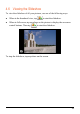
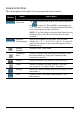
Brightness Tap the button to adjust the brightness of the picture.
Zoom Tap the button to zoom in to 1.2x, 1.5x, 1.8x, or 2.0x, or,
after zooming in, to zoom out.
When you have zoomed in the picture, you can drag the
picture to view other parts of the picture.
Back
Goes back to the thumbnail view.
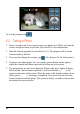
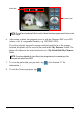
If you open a photo that contains geographic coordinates information, three
additional control buttons appear along the right side of the screen as shown
below. (You can take photos to include geographic coordinates information using
the Camera program. See Section 5.3 for details.)
Starts MioMap to navigate to the
shooting location of the photo.
Starts MioMap to save the
location as a favorite location.
Starts MioMap to display the
location on the map.