
Operating Instructions



35
5 Camera
5.1 Starting and Exiting Camera
Camera allows you to take photos or record videos. You can view your photos
and videos in the program.
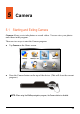
There are two ways to start the Camera program:
z Tap Camera on the Home screen.
z Press the Camera button on the top of the device. (This will close the current
program.)
NOTE: When using the MioMap navigation program, the Camera button is disabled.