
Operating Instructions



38
Camera Screen Elements
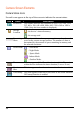
Camera Status Icons
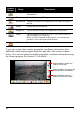
Several icons appear at the top of the screen to indicate the current status:
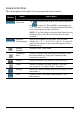
Icon Name Description
Resolution The number indicates the resolution is set to 320 x 240, 336 x
252, 400 x 300, 640 x 480, 800 x 600, 1280 x 960 or 1600 x
1200. (Only the front number is displayed.)
Storage
Location
− the device’s internal memory
− the storage card
Remaining
Shots
The number indicates how many more shots can be taken and
saved to the current storage location. The number of shots is
determined by the amount of space remaining in memory and
the selected resolution.
Scene Mode
− Auto Mode
− Night Mode
− Sports Mode
− Indoor Mode
− Outdoor Mode.
Timer This icon appears if the Timer function is enabled. The number
within the icon indicates the timer duration (5 sec or 10 sec).
Continuous
Shot
This icon appears when the continuous shot function is enabled.
GPS Stamp This icon appears in the lower left corner of the screen when the
GPS stamp function is enabled.