
Operating Instructions


45
Video Control Panel
The control panel to the right of the screen provides these buttons:
Control
Button
Name Description
Change
Function
Switch to the Camera mode.
Zoom In/
Zoom Out
Tap
to zoom in the camera lens; when zoomed in, tap
to zoom out. The available zoom settings are: 1x,
1.25x, and 2x. A scale will appear at the bottom of the
screen showing the current zoom ratio.
Settings Opens the Video Settings screen. (See Section 5.6 for more
information)
View Switches to the View mode. (See Section 5.7 for more
information)
5.6 Video Settings
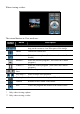
Tap on the control panel while in Video mode and the Video Settings screen
as shown below appears.
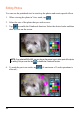
Tap the set value for an item to open the sub-menu (except for the Reset item). In
the sub-menu select the desired value. A check indicates the current value.