
Operating Instructions


48
Editing Photos
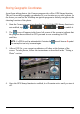
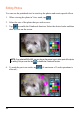
You can use the paintbrush tool to touch up the photos and create special effects.
1. When viewing the photo in View mode, tap
.
2. Select the size of the photo that you wish to save.
3. Tap
to enable the Paintbrush function. Select the desired color and then
draw or write on the screen.
NOTE: If you selected 640 x 480, you can drag on the screen to go to other parts of the photo
for editing. But you must first tap to disable the Paintbrush function.
4. To undo the previous stroke, tap
. (A maximum of 3 undo operations is
allowed.)