
Operating Instructions




67
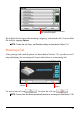
By default, the list shows the incoming, outgoing, and missed calls. You can filter
the calls by tapping
Options.
NOTE: To clear the call history, use Bluetooth settings as described in Section 11.8.
Receiving a Call
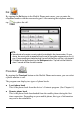
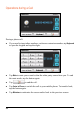
After pairing with a mobile phone (as described in Section 7.2), your device will
ring and display the incoming call screen when there is an incoming call.
To receive the call, tap
. To reject the call, tap .
NOTE: You can have the device automatically answer an incoming call. (See Section 11.8.)
Save the selected phone number to
the Contacts program.
Reject
Answe
r