
Operating Instructions



75
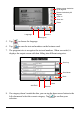
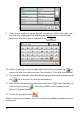
5. Tap
to choose the language.
6. Tap
to scan the text and numbers on the business card.
7. The program tries to recognize the text and numbers. When succeeded, it
displays the output screen with data falling into different categories.
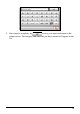
8. If a category doesn’t match the data, you can tap the down arrow button in the
left column and select the correct category. Tap
to confirm your
selection.
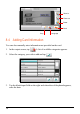
Zoom In
Rotate counte
r
-clockwise
by 90 degrees
Camera
Back
Language
Recognize
Rotate clockwise by 90
degrees
Zoom out
Reset
Save
Back
Add Field
Re-scan
Scroll down
Scroll up