
Operating Instructions




78
8.4 Adding Card Information
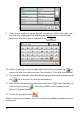
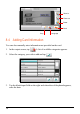
You can also manually enter information not provided on the card.
1. In the output screen, tap
. A list of available categories appears.
2. Select the category you wish to add and tap
.
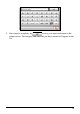
3. Tap the blank input field on the right and when the soft keyboard appears,
enter the data.
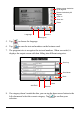
Zoom in
Zoom out
Reset
Back
Language
Crop