
Specifications




Checking power supply Using programmable controllers
MELSEC-L Series Quick start guide 2 - 9
2.5 Checking power supply
Check that the power supply runs normally after configuring the system, mounting modules, and wir-
ing.
Operating procedure
● Check before turning on the power supply.
–Wiring of the power supply
– Power supply voltage
● Set the CPU module to STOP.
Open the cover on the front of the CPU module and set the switch to STOP.
● Turn on the power supply module.
● Check that the power supply runs normally.
Check the front LEDs on each module.
The following shows the normal state of the LEDs.
–Power supply module: "POWER" LED lights in green.
– CPU module: "MODE" LED lights in green.
When a parameter or program is not written to the CPU module, the "ERR." LED flashes red, but it
is not a problem at this stage. The LED goes off when a program is written.
Also refer to section 2.7 "Writing programs".
● Construction of the system is complete. Turn off the power supply.
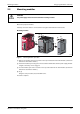
Fig. 2-6:
RESET/STOP/RUN switch
I04001
Fig. 2-7:
Normal states of LED
LS600002
RESET/STOP/RUN
"ERR." LED
flashes red.