
Instruction manual


81
•
•••••••••••••••••••••••••••••••••••••••••••••••••••••••••••••••••••••••••••••••••••••••••••••••••••••••••••••••••••••
Comment search
ENGLISH
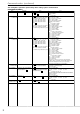
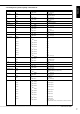
■ Sample operation
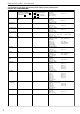
1) Record character string “ABCDEF” as a comment along with the video. (When “DELIMITER” in the <RS-232C SET-
TING> screen is set to “CR”.)
The operation is performed on a PC.
1. Set the character (or characters string) to be recorded;
2. Record the selected character(s).
By using the COMS command, characters which have been set once can be recorded any number of times. To record a
different character set, use the COMD command.
Up to 32 characters can be inputted.
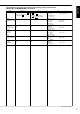
2) Display the recorded comment.
1. Select <SETTINGS> } “CAMERA DISPLAY” in the <TIME DATE/DISPLAY SETTINGS> screen. Display “COM-
MENT” and confirm.
The number of characters displayed on the screen : all 32 for single screen, first 10 for SPLIT4, and first 6 for
SPLIT9.
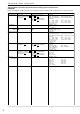
3) Skip to the scene with characters “ABCDEF”. (When “DELIMITER” in the <RS-232C SETTINGS> screen is set to
“CR”.)
The operation is performed on a PC.
After comment search, playback is performed using single screen display.
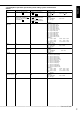
Comment search can be performed even when playback is stopped, during still frame playback, playback or
recording.
The unit will fast forward or rewind until it finds the character string, then shift into still frame mode.
Comment searches may be time-consuming as the process involves searching through all the data.
If the unit does not find the character string, it will stop automatically.