
User`s manual

141
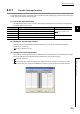
CHAPTER 4 FUNCTION
4
4.10 Count Disable/Preset/replace Function
4.10 Count Disable/Preset/replace Function
The count disable/preset/replace function enables the QD65PD2 to execute either of the count disable function or the
preset/replace function according to the status change of the function input terminal (FUNC1).
(1) Setting for the count disable/preset/replace function
To use the count disable/preset/replace function, select "Count disable/Preset/replace Function" in the "Counter
function selection" in the switch setting.
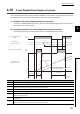
(2) Operation example of the count disable/preset/replace function
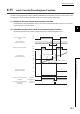
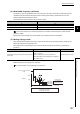
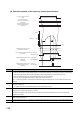
The following figure shows an operation example of the count disable/preset/replace function.
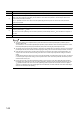
Number Description
1) The module starts counting by turning on CH1 Count enable command (Y06).
2) The module stops counting at the rise of the function input terminal (FUNC1).
3)
At the fall of the function input terminal (FUNC1), the values in CH1 Preset value (Un\G1014, Un\G1015) are stored in CH1
Present value (Un\G1050, Un\G1051), and the module resumes the count.
4) Set any values to CH1 Preset value (Un\G1014, Un\G1015).
5) The module stops counting by turning off CH1 Count enable command (Y06).
6)
The module continues to stop counting regardless of the function input terminal (FUNC1) status, since CH1 Count enable
command (Y06) remains OFF.
7)
With the function input terminal (FUNC1) being ON, the module does not start counting even by turning on CH1 Count enable
command (Y06).
8)
At the fall of the function input terminal (FUNC1), the values in CH1 Preset value (Un\G1014, Un\G1015) are stored in CH1
Present value (Un\G1050, Un\G1051), and the module resumes the count.
0 100
1) 5)
4)
2) 3) 6) 8)
7)
Count stop
Count stopCount stop
*1 t 2ms
t *1
ON
OFF
ON
OFF
100
0
CH1 Count enable command
(Y06)
CH1 Preset value
(Un\G1014, Un\G1015)
Function input terminal (FUNC1)
CH1 Present value
(Un\G1050, Un\G1051)
Pulses actually input
Count value stored in CH1 Present value
(Un\G1050, Un\G1051)