
User`s manual



155
CHAPTER 4 FUNCTION
4
4.15 Pulse Measurement Function
4.15 Pulse Measurement Function
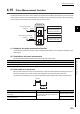
The pulse measurement function is used to measure the ON width or OFF width of pulses that are input to the external
input terminals, the function input terminal (FUNC1) or the latch counter input terminal (LATCH1). When the following
pulse is measured, the measured value is written over the previous value.
(1) Setting for the pulse measurement function
To use the pulse measurement function, select "Pulse Measurement Mode" in the "Operation mode setting" in the
switch setting.
(2) Terminals for the pulse measurement
The following table lists the terminals that are used for the pulse measurement.
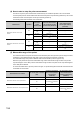
(3) Pulse width to be measured
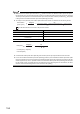
Set which pulse width (ON or OFF) is to be measured by using CH1 Pulse measurement setting (function input
terminal) (Un\G1200) or CH1 Pulse measurement setting (latch counter input terminal) (Un\G1201).
The setting value is enabled by turning off and on Operating condition settings batch-change command (Y01)
.
Terminals for the pulse measurement
Function input terminal (FUNC1)
Latch counter input terminal (LATCH1)
Setting item Setting contents Reference
CH1 Pulse measurement setting (function input terminal)
(Un\G1200)
Select which pulse width (ON or OFF) is to be
measured, and set it.
Page 83, Section 3.4.2 (54)
CH1 Pulse measurement setting (latch counter input
terminal) (Un\G1201)
Page 83, Section 3.4.2 (55)
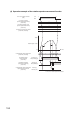
Function input terminal
(FUNC1)
Pulses
QD65PD2
Buffer memory
Analysis
CH1 Measured pulse value
(function input terminal)
(Un\G1222, Un\G1223)
Latch counter input terminal
(LATCH1)
Pulses
Buffer memory
Analysis
CH1 Measured pulse value
(latch counter input terminal)
(Un\G1242, Un\G1243)
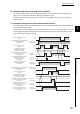
ON width
OFF width