
User`s manual



158
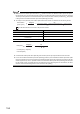
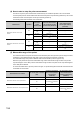
● Turn on CH1 Count enable command (Y06) regardless of the number of the input terminals to be used for the
measurement.
● When the pulse measurement function is executed by the function input terminal (FUNC1), the time to be taken to update
CH1 Measured pulse value (function input terminal) (Un\G1222, Un\G1223) varies according to the time set in "Function
input response time setting" in the switch setting.
● When the pulse measurement function is executed by the latch counter input terminal (LATCH1), the time to be taken to
update CH1 Measured pulse value (latch counter input terminal) (Un\G1242, Un\G1243) varies according to the time set
in "Latch counter input response time setting" in the switch setting.
● Do not use CH1 Measured pulse value update flag (function input terminal) (Un\G1221) and CH1 Pulse measurement
start command (function input terminal) (Un\G1210) when retrieving CH1 Measured pulse value (function input terminal)
(Un\G1222, Un\G1223) via the auto refresh target device. (In case 1
H
: Updated is stored in CH1 Measured pulse value
update flag (function input terminal) (Un\G1221) after the auto refresh is done, the updated values are not reflected to the
auto refresh target device and therefore, the values retrieved via the auto refresh target device are the ones before the
updating.)
The same can be applied to the measurement with the latch counter input terminal (LATCH1) except the difference of
buffer memories.
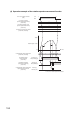
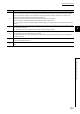
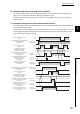
Number Description
1)
Perform the following operations when CH1 Count enable command (Y06) is turned on with 1
H
: Measured being set to CH1
Pulse measurement start command (function input terminal) (Un\G1210):
• Reset CH1 Measured pulse value update flag (function input terminal) (Un\G1221) to 0
H
: Not updated.
• Clear the values in CH1 Measured pulse value (function input terminal) (Un\G1222, Un\G1223) to 0.
Also, 1
H
: Operating is stored in CH1 Pulse measurement flag (function input terminal) (Un\G1220) when CH1 Count enable
command (Y06) is turned on.
2)
The following operation is performed when the measured value of the pulse is stored in CH1 Measured pulse value (function
input terminal) (Un\G1222, Un\G1223):
•1
H
: Updated is stored in CH1 Measured pulse value update flag (function input terminal) (Un\G1221).
3)
Reset CH1 Measured pulse value update flag (function input terminal) (Un\G1221) to 0
H
: Not updated by setting CH1
Measured pulse value update flag reset command (function input terminal) (Un\G1211) to 1
H
: Reset.
CH1 Measured pulse value update flag reset command (function input terminal) (Un\G1211) is automatically reset to 0
H
: Not
reset after the completion of the reset.
4)
CH1 Measured pulse value (function input terminal) (Un\G1222, Un\G1223) is updated when 1
H
: Updated is stored in CH1
Measured pulse value update flag (function input terminal) (Un\G1221).
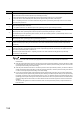
5)
0
H
: Not operating is stored in CH1 Pulse measurement flag (function input terminal) (Un\G1220) by turning off CH1 Count
enable command (Y06) or setting 0
H
: Not measured to CH1 Pulse measurement start command (function input terminal)
(Un\G1210).
6)
If the pulse (pulse ON width in this case) is input before 1
H
: Operating is stored in CH1 Pulse measurement flag (function input
terminal) (Un\G1220), CH1 Measured pulse value (function input terminal) (Un\G1222, Un\G1223) is not updated even when
the function input terminal (FUNC1) is turned off.
Note that the pulse that is input after 1
H
: Operating is stored in CH1 Pulse measurement flag (function input terminal)
(Un\G1220) is to be measured.