
User`s manual

192
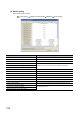
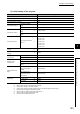
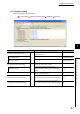
(2) Switch setting
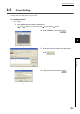
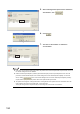
Set the switch setting as follows.
Project window [Intelligent Function Module] [QD65PD2] [Switch Setting]
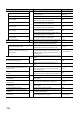
Item Setting value
Comparison output setting value Set comparison output depending on the program example to be used.
Coincidence output 1 channel assignment setting 0: CH1
Coincidence output 2 channel assignment setting 0: CH1
Coincidence output 3 channel assignment setting
Setting is not necessary for the program examples in this chapter.
•••
Coincidence output 8 channel assignment setting
Operation mode setting Set operation mode depending on the program example to be used.
Count source selection 0: A Phase/B Phase
Pulse input mode 3: 2-Phase Multiple of 1
Counting speed setting 2: 200kpps
Counter format Set a counter format depending on the program example to be used.
Function input logic setting 0: Positive Logic
Latch counter input logic setting 0: Positive Logic
Counter function selection Set a counter function depending on the program example to be used.
Z phase input response time setting
Set any response time.Function input response time setting
Latch counter input response time setting