
User`s manual

194
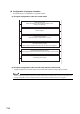
(4) Configuration of program examples
The following figure is a configuration of a program example.
(a) Program configuration under the normal mode
(b) Program configuration under a mode other than the normal mode
Program examples under a mode other than the normal mode operate in a single-program example.
If error or warning processing is required for a program example under a mode other than the normal mode, add the error/
warning reset program of the normal mode shown in this section before the END instruction of each program.
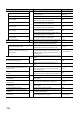
Initial setting program
(When the intelligent function module parameter is used,
setting is not required.)
Common program
Counter function program
Select the program for the function to be used.
Comparison output function (coincidence output function or
cam switch function) program
When using the comparison output function, use either of the programs.
Overflow/underflow detection program
(Use this program when the linear counter function is set as the counter format.)
Error/warning reset program