
User`s manual

197
CHAPTER 7 PROGRAMMING
7
7.1 Using the Module in a Standard System Configuration
7.1.1 Program example when the parameters of the intelligent function module are used
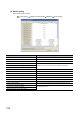
(2) Parameter setting
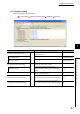
Set the initial settings in the parameters.
Project window [Intelligent Function Module] [QD65PD2] [Parameter]
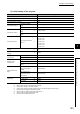
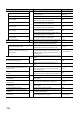
Item Description Setting value
Coincidence output condition setting
*1
Set the comparison condition when performing
coincidence output.
Coincidence output 1
Set the comparison condition for the coincidence output
1.
0: Coincidence output
Coincidence output 2
Set the comparison condition for the coincidence output
2.
1: In-Range Output
Coincidence detection interrupt setting
*2
Set whether to perform an interrupt when the count value
matches with a preset value or range.
Coincidence output 1
Set whether to perform an interrupt when the
coincidence output 1 is detected with a matched value or
range.
1: Use
Point setting (coincidence output 1)
*1
Set the value where the count value is to be compared
with for the coincidence output 1.
1000
Lower limit value (coincidence output 2)
Set the lower limit value of the range where the count
value is to be compared with for the coincidence output
2.
1000
Upper limit value (coincidence output 2)
Set the upper limit value of the range where the count
value is to be compared with for the coincidence output
2.
2000