
User`s manual

209
CHAPTER 7 PROGRAMMING
7
7.1 Using the Module in a Standard System Configuration
7.1.2 Program example when the parameters of the intelligent function module are not used
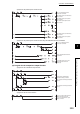
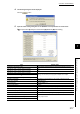
• program for the periodic pulse counter function
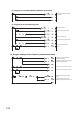
• program for the periodic pulse counter function using the dedicated instruction, PPCVRD1
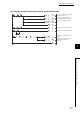
(d) Program for the comparison output function
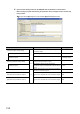
• program for the coincidence output function
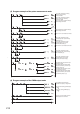
• program for the cam switch function
Turn on CH1 Selected counter
function start command.
CH1 Periodic pulse count difference
value is stored.
CH1 Periodic pulse count present
value is stored.
CH1 Periodic pulse update check
value is stored.
CH1 Periodic pulse count difference
value is stored.
CH1 Periodic pulse count present
value is stored.
Turn on CH1 Selected counter
function start command.
Perform the dedicated instruction,
G.PPCVRD1.
CH1 Periodic pulse count value
update flag reset command
: Reset (1
H)
Counter value greater/smaller
(coincidence output) is stored.
Turn on Reset command (coincidence
output 1).
Turn off Reset command (coincidence
output 1).
Turn on CH1 Cam switch function/
PWM output start command.
Turn on CH1 Coincidence output
enable command.