
User`s manual

212
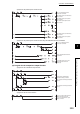
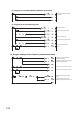
(5) Program example of the pulse measurement mode
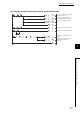
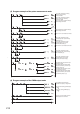
(6) Program example of the PWM output mode
CH1 Pulse measurement setting
(latch counter input terminal)
: Pulse OFF width
Turn off Operating condition settings
batch-change command.
Turn on Operating condition settings
batch-change command.
Turn on CH1 Count enable command.
Turn off CH1 Count enable command.
CH1 Pulse measurement start
command (function input terminal)
: Measured (1
H)
CH1 Pulse measurement start
command (latch counter input
terminal): Measured (1
H)
CH1 Pulse measurement start
command (function input terminal)
: Not measured (0
H)
CH1 Measured pulse value update
flag reset command (function input
terminal): Reset (1
H)
CH1 Measured value (function input
terminal) is stored.
CH1 Pulse measurement start
command (latch counter input
terminal): Not measured (0
H)
CH1 Measured pulse value update
flag reset command (latch counter
input terminal): Reset (1
H)
CH1 Measured value (latch counter
input terminal) is stored.
CH1 Pulse measurement setting
(function input terminal)
: Pulse ON width
CH1 On width setting (PWM output)
: 100 s
CH1 Cycle setting (PWM output)
: 200 s
Turn on CH1 Cam switch function/
PWM output start command.
CH1 PWM output assignment
(coincidence output 1): Assignment