
User`s manual

215
CHAPTER 7 PROGRAMMING
7
7.2 When Using the QD65PD2 in a MELSECNET/H Remote I/O net
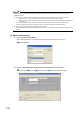
3. Open the network range assignment setting window and set parameters as shown below.
[Ethernet/CC IE/MELSECNET] button
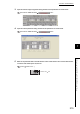
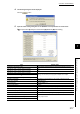
4. Open the refresh parameter setting window and set parameters as shown below.
[Ethernet/CC IE/MELSECNET] button
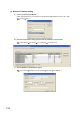
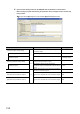
5. Write the set parameter data to the CPU module on the master station. Then reset the CPU module
or turn the CPU module power off, then on.
[Online] [Write to PLC...]
or Power OFF ON
RESET