
User`s manual

216
(6) Remote I/O station setting
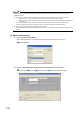
1. Create a project using GX Works2.
Select "QCPU(Q mode)" for "PLC Series" and "QJ72LP25/QJ72BR15(Remote I/O)" for "PLC Type".
[Project] [New...]
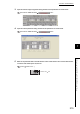
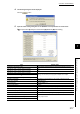
2. Open the PLC parameter setting dialog box and set parameters as shown below.
Project window [Parameter] [PLC Parameter] [I/O Assignment]
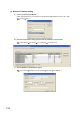
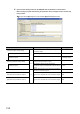
3. Add the QD65PD2 to the GX Works2 project.
Project window [Intelligent Function Module] right-click [New Module...]