
User`s manual


250
7.3 Program Example with the Coincidence Detection
Interrupt Function
This section describes a program example in which an interrupt program starts when the count value matches with a
value or range specified by the user, or at cycle transition when the periodic pulse counter function is used.
(1) System configuration
System configuration is the same as the example used in a standard system configuration.
Page 191, Section 7.1 (1)
(2) Program condition
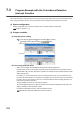
(a) Interrupt pointer setting
Project window [Parameter] [PLC Parameter] [PLC System]
[Intelligent Function Module Setting] button
• Setting example for the coincidence detection interrupt function
• Setting example for the periodic interrupt function
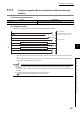
(b) To use only particular SI No.
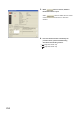
• Setting in the "Intelligent Function Module Interrupt Pointer Setting" dialogue box
Interrupt factors as many as the number of interrupt pointers (Interrupt Pointer Count) starting from the
specified Start SI No. are used. (Start SI No. specified in the "Intelligent Function Module Interrupt Pointer
Setting" dialogue box)
For example, if 1 is set for "Start SI No." and 2 for "Interrupt Pointer Count", only SI1 and SI2 are used.
If the interrupt pointer setting is not configured in the dialogue box, the interrupt function is not performed.
For SI No. not to be used, set them not to use in Coincidence detection interrupt setting (Un\G2) or CH1
Periodic interrupt setting (Un\G1001).
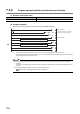
• Using the IMASK instruction from the sequence program
By using the IMASK instruction, an interrupt program can be enabled or disabled (interrupt mask). This
setting is available per interrupt pointer number.
For details on the IMASK instruction, refer to the following manual.
MELSEC-Q/L Programming Manual (Common Instructions)