
User`s manual


251
CHAPTER 7 PROGRAMMING
7
7.3 Program Example with the Coincidence Detection Interrupt Function
7.3.1 Program example with the coincidence detection interrupt function
7.3.1 Program example with the coincidence detection interrupt
function
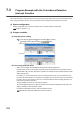
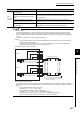
(1) Devices used by the user
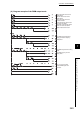
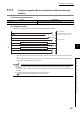
(2) Program example
Before using an interrupt pointer, enable an interrupt by the IMASK instruction.
*1 When using the coincidence detection interrupt function, Coincidence detection interrupt setting (Un\G2) needs to be
set.
After Coincidence detection interrupt setting (Un\G2) is set, the setting is activated by switching Operating condition
settings batch-change command (Y01) from off to on.
● In the above program example, interrupt programs except for the I50 interrupt program are disabled by the IMASK
instruction.
To execute any interrupt program other than I50, set the bit that corresponds to the execution-target interrupt pointer to 1
(enabled).
● For details on IMASK instruction, please refer to the following manual.
MELSEC-Q/L Programming Manual (Common Instructions)
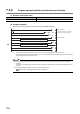
Device Description
D100 to D115 stores interrupt enable flag for the IMASK instruction
The I50 interrupt program is enabled.
The 50th bit from D100 is turned on.
Interrupt is enabled.
Interrupt is disabled.
Interrupt program
Program for the QD65PD2
*1