
User`s manual


253
CHAPTER 8 TROUBLESHOOTING
8
8.1 Before Troubleshooting
CHAPTER 8 TROUBLESHOOTING
This chapter describes how to identify error causes and to correct errors when they occur on the QD65PD2.
8.1 Before Troubleshooting
Check if the POWER LED of the power supply module and the MODE LED of the CPU module are on. If any of them
is off, troubleshoot the CPU module.
QCPU User's Manual (Hardware Design, Maintenance and Inspection)
8.2 Troubleshooting Procedure
This section explains the procedure to identify the problem cause and to take corrective actions. Use GX Works2 for
this procedure.
(1) Procedure
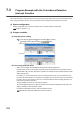
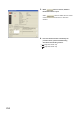
1. Connect GX Works2 to the CPU module, and open
the "System Monitor" dialog box.
[Diagnostics] [System Monitor]
2. After confirming that an error is indicated on the
QD65PD2, select the QD65PD2, then click
button.
If an error is indicated on a module other than the
QD65PD2, refer to the user's manual corresponds to
the module and take a corrective action.