
User`s manual


262
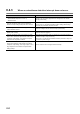
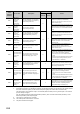
8.4.5 When counter function selection cannot be performed
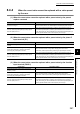
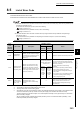
(1) When counter function selection does not start by CH1 Selected counter
function start command (Y07)
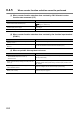
(2) When counter function selection does not start by the function input terminal
(FUNC1)
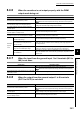
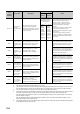
(3) When an periodic interrupt does not occur
Check item Corrective action
Is it counter function selection that uses CH1 Selected
counter function start command (Y07)?
Check by referring to the following section.
( Page 131, Section 4.6)
Is the ON/OFF time of CH1 Selected counter function start
command (Y07) 2ms or longer?
Set the ON/OFF time of CH1 Selected counter function start command (Y07)
2ms or longer.
Has the function input terminal (FUNC1) been on? Turn off the function input terminal (FUNC1).
Check item Corrective action
Is the external wiring of the function input terminal
(FUNC1) correct?
Check the external wiring and correct errors.
Has CH1 Selected counter function start command (Y07)
been on?
Turn off CH1 Selected counter function start command (Y07).
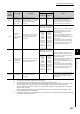
Check item Corrective action
Has the following CPU module been used?
• Q00J/Q00/Q01CPU(function version A)
• Redundant CPU
Change to the CPU module applicable to the intelligent function module
interrupt pointer setting.
Has CH1 Periodic interrupt setting (Un\G1001) been set
to Use (1
H
)
Set CH1 Periodic interrupt setting (Un\G1001) to Use (1
H
), and switch
Operating condition settings batch-change command (Y01) as follows; OFF,
ON, and OFF.
Is the intelligent function module interrupt pointer setting
in PLC Parameter correct?
Review the intelligent function module interrupt pointer setting.
Are the program operation control instructions, such as
IMASK, used correctly?
Review the sequence program.