
User`s manual


267
CHAPTER 8 TROUBLESHOOTING
8
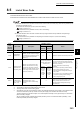
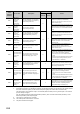
8.5 List of Error Code
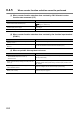
*1 "n" of the error code indicates the number (1 to 8) of Coincidence output in which the error occurs.
*3 The operation is performed normally unless an error occurs.
*6 The cam switch function is not executed. The error does not affect the other functions.
*7 All operations except the error handling are stopped. Yet dedicated instructions are processed on the condition that the
error does not affect the system (in case its error code (last 3 digits) is the numbers other than 800 to 859).
The signal output to the coincidence output 1 to 8 terminals (EQU1 to EQU8) or to the general output 1 to 8 terminals
(OUT1 to OUT8) is stopped.
Also, the updating of EQU1 to EQU8 terminal status (Un\G951), OUT1 to OUT8 terminal status (Un\G952), or CH1
External input status (Un\G1450) is stopped.
*8 The sampling counter function or the periodic pulse counter function is executed by using normal setting value that was
set just before the wrong values was set.
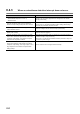
Error
code
(decimal
notation)
Error name Description
Operation at error
Action
Error
channel
Other
channel
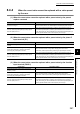
3n5*1
Cam switch
function, step No.13
to No.16 setting
error (coincidence
output 1 to 8)
The values set to Cam switch
function, step No.13 to No.16 setting
(coincidence output 1) (Un\G226 to
Un\G233) are not ascending
sequence.
*6 *3
Set values to Cam switch function, step No.13
to No.16 setting (coincidence output 1)
(Un\G226 to Un\G233) in ascending sequence,
and then turn off and on CH1 Cam switch
function/PWM output start command (Y08).
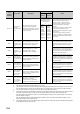
501
CH Time unit
setting error
(sampling counter/
periodic pulse
counter)
The value other than 0 or 1 is set to
CH1 Time unit setting (sampling
counter/periodic pulse counter)
(Un\G1016).
In case of turning off and on
Operating condition settings
batch-change command (Y01)
*7
Set the value of 0 or 1 to CH1 Time unit setting
(sampling counter/periodic pulse counter)
(Un\G1016), and then perform either of the
following operations:
• Turn off and on Operating condition settings
batch-change command (Y01) when
Operating condition settings batch-changed
(X01) is OFF.
• Set CH1 Setting change request (sampling
counter/periodic pulse counter) (Un\G1020)
to 1
H: Requested when Operating condition
settings batch-changed (X01) is ON.
In case of
setting CH1
Setting
change
request
(sampling
counter/
periodic pulse
counter)
(Un\G1020)
to 1
H
:
Requested
*8
In case of
setting CH1
Setting
change
request
(sampling
counter/
periodic pulse
counter)
(Un\G1020)
to 1
H
:
Requested
*3
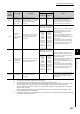
502
CH Cycle setting
error (sampling
counter/periodic
pulse counter)
The value of 0 is set to CH1 Cycle
setting (sampling counter/periodic
pulse counter) (Un\G1017).
In case of turning off and on
Operating condition settings
batch-change command (Y01)
*7
Set the value between 1 and 65535 to CH1
Cycle setting (sampling counter/periodic pulse
counter) (Un\G1017), and then perform either
of the following operations:
• Turn off and on Operating condition settings
batch-change command (Y01) when
Operating condition settings batch-changed
(X01) is OFF.
• Set CH1 Setting change request (sampling
counter/periodic pulse counter) (Un\G1020)
to 1
H: Requested when Operating condition
settings batch-changed (X01) is ON.
In case of
setting CH1
Setting
change
request
(sampling
counter/
periodic pulse
counter)
(Un\G1020)
to 1
H
:
Requested
*8
In case of
setting CH1
Setting
change
request
(sampling
counter/
periodic pulse
counter)
(Un\G1020)
to 1
H
:
Requested
*3
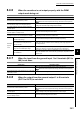
503
CH Periodic
interrupt setting
error
The value other than 0 or 1 is set to
CH1 Periodic interrupt setting
(Un\G1001).
*7
Set the value of 0 or 1 to CH1 Periodic interrupt
setting (Un\G1001), and then turn off and on
Operating condition settings batch-change
command (Y01).