
User`s manual


268
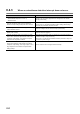
*3 The operation is performed normally unless an error occurs.
*7 All operations except the error handling are stopped. Yet dedicated instructions are processed on the condition that the
error does not affect the system (in case its error code (last 3 digits) is the numbers other than 800 to 859).
The signal output to the coincidence output 1 to 8 terminals (EQU1 to EQU8) or to the general output 1 to 8 terminals
(OUT1 to OUT8) is stopped.
Also, the updating of EQU1 to EQU8 terminal status (Un\G951), OUT1 to OUT8 terminal status (Un\G952), or CH1
External input status (Un\G1450) is stopped.
*9 The frequency measurement is not started.
*10 The rotation speed measurement is not started.
*11 The pulse measurement is stopped.
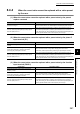
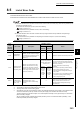
Error
code
(decimal
notation)
Error name Description
Operation at error
Action
Error
channel
Other
channel
601
CH Moving
average count
setting error
(frequency
measurement)
The value other than 1 to 100 is set to
CH1 Moving average count (frequency
measurement) (Un\G1101).
*9
*3
Set the value between 1 and 100 to CH1 Moving
average count (frequency measurement)
(Un\G1101), and then turn off and on CH1 Count
enable command (Y06).
602
CH Time unit
setting error
(frequency
measurement)
The value other than 0 to 2 is set to CH1
Time unit setting (frequency
measurement) (Un\G1100).
Set the value between 0 and 2 to CH1 Time unit
setting (frequency measurement) (Un\G1100), and
then turn off and on CH1 Count enable command
(Y06).
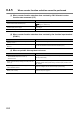
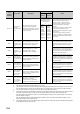
621
CH Moving
average count
setting error
(rotation speed
measurement)
The value other than 1 to 100 is set to
CH1 Moving average count (rotation
speed measurement) (Un\G1151).
*10
Set the value between 1 and 100 to CH1 Moving
average count (rotation speed measurement)
(Un\G1151), and then turn off and on CH1 Count
enable command (Y06).
622
CH Time unit
setting error
(rotation speed
measurement)
The value other than 0 to 2 is set to CH1
Time unit setting (rotation speed
measurement) (Un\G1150).
Set the value between 0 and 2 to CH1 Time unit
setting (rotation speed measurement) (Un\G1150),
and then turn off and on CH1 Count enable
command (Y06).
623
CH Number of
pulses per rotation
setting error
The value other than 1 to 8000000 is set
to CH1 Number of pulses per rotation
(Un\G1152, Un\G1153).
Set the value between 0 and 8000000 to CH1
Number of pulses per rotation (Un\G1152,
Un\G1153), and then turn off and on CH1 Count
enable command (Y06).
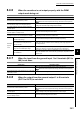
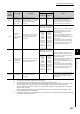
660
Pulse measurement
range overflow error
(function input
terminal)
The pulse that is input to the function
input terminal (FUNC1) is beyond the
measurable range (approx. 214s).
*11
Measure the pulse within the measurable range.
To resume the measurement, input the pulse once
again, or perform the following operations:
• Turn off and on CH1 Count enable command
(Y06).
• Switch CH1 Pulse measurement start command
(function input terminal) (Un\G1210) from 0
H:
Not measured to 1
H: Measured.
661
CH Pulse
measurement
setting error
(function input
terminal)
The value other than 0 or 1 is set to CH1
Pulse measurement setting (function
input terminal)(Un\G1200).
*7
Set the value of 0 or 1 to CH1 Pulse measurement
setting (function input terminal) (Un\G1200), and
then turn off and on Operating condition settings
batch-change command (Y01).
662
Pulse measurement
range overflow error
(latch counter input
terminal)
The pulse that is input to the latch
counter input terminal (LATCH1) is
beyond the measurable range (approx.
214s).
*11 *3
Measure the pulse within the measurable range.
To resume the measurement, input the pulse once
again, or perform the following operations:
• Turn off and on CH1 Count enable command
(Y06).
• Switch CH1 Pulse measurement start command
(latch counter input terminal) (Un\G1212) from
0
H: Not measured to 1H: Measured.
663
CH Pulse
measurement
setting error (latch
counter input
terminal)
The value other than 0 or 1 is set to CH1
Pulse measurement setting (latch
counter input terminal) (Un\G1201).
*7
Set the value of 0 or 1 to CH1 Pulse measurement
setting (latch counter input terminal) (Un\G1201),
and then turn off and on Operating condition
settings batch-change command (Y01).