
User`s manual

29
CHAPTER 3 SPECIFICATIONS
3
3.1 Performance Specifications
3.1.2 Number of parameter that can be set
3.1.2 Number of parameter that can be set
Configure the parameters of the initial setting and the auto refresh setting of the QD65PD2 within the number of
parameters that can be set to the CPU module, including the number of parameters set for other intelligent function
modules. For the maximum number of parameters that can be set to the CPU module, refer to the following:
QCPU User's Manual (Hardware Design, Maintenance and Inspection)
(1) Number of the QD65PD2 parameters
The following number of parameters can be set for the one piece of the QD65PD2
(2) Checking the number of parameters
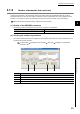
The number of parameters set for the intelligent function module and the maximum number of parameters can be
checked by the following operation.
Project window [Intelligent Function Module] Right-click [Intelligent Function Module
Parameter List]
Initial setting Auto refresh setting
18 62 (Maximum number)
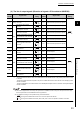
No. Description
1) The total number of parameters in the initial setting that are selected on the screen
2) The maximum number of parameters in the initial setting
3) The total number of parameters in the auto refresh setting that are selected on the screen
4) The maximum number of parameters in the auto refresh setting
1) 2) 3) 4)