
User`s manual

86
(65)CH1 Measured pulse value (latch counter input terminal) (Un\G1242,
Un\G1243)
• These memories store the measured value of pulse ON width or pulse OFF width that is input to the latch
counter input terminal (LATCH1).
• The measurement range is between 2000 and 2147483647 (0.1µs per unit).
• The stored value is cleared to 0 by turning off and on Operating condition settings batch-change command
(Y01).
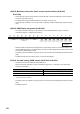
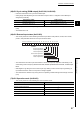
(66)CH1 PWM output assignment (Un\G1300)
• Out of eight Coincidence outputs (1 to 8), select just one for the PWM waveform output, and set the
Coincidence output to 1: Assigned in this memory.
• Select Coincidence outputs that are assigned to the corresponding channel in "Coincidence output 1 to 8
channel assignment setting" in the switch setting. Coincidence outputs assigned to the other channel can not
be used for the PWM waveform output.
• The setting values are enabled by turning off and on CH1 Cam switch function/PWM output start command
(Y08).
• The default values set to Coincidence output 1 to 8 are 0: Not assigned.
(67)CH1 On width setting (PWM output) (Un\G1302, Un\G1303)
• Use these memories to set ON width of the PWM output.
• Setting range varies depending on which Coincidence output is set to 1: Assigned in CH1 PWM output
assignment (Un\G1300).
*1 For any Coincidence outputs, set the values that are equal to or smaller than the ones set to CH1 Cycle setting (PWM
output) (Un\G1304, Un\G1305).
• The setting values are enabled by turning off and on CH1 Cam switch function/PWM output start command
(Y08).
• The default value is 0.
Coincidence output
*1
Setting range
Coincidence output 1 or 2 0 or 10 to 10000000 (0.1µs per unit)
Coincidence output 3 to 8 0 or 1000 to 10000000 (0.1µs per unit)
b15
0
b14
0
b13
0
b12
0
b11
0
b10
0
b9
0
b8
0
b7 b6 b5 b4 b3 b2 b1 b0
Coincidence
output 1
Coincidence
output 2
Coincidence
output 3
Coincidence
output 4
Coincidence
output 5
Coincidence
output 6
Coincidence
output 7
Coincidence
output 8
Fixed to 0.
0: Not assigned
1: Assigned