
Instruction manual



6
4
FEATURES AND FUNCTIONS
OPEN
PRINT
COPY
FEED
FUNC
CONT
BRT
ADJUST
BRT
CONT
EXP.
SIZE
MODE
SIDE
MULTI
NOR
1:1
SINGLE
EXP.
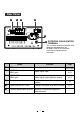
Front Panel
12 • 31
Power switch Turns on/off the power.
Function
Name
Reference
Page
Selects the size of images to print.
MODE switch
Selects the extended function of the SIZE
switch.
Indicator
14 • 23
Sets the brightness of the print image.
ADJUST control
22
23
13•15•17-20•
24-28•30
Displays stand-by, functions and error
messages.
Indicator (BRT/CONT/EXP.)
Displays the function being set.
BRT (brightness) button
Turn to change the settings of each
function.
16
Selects the function mode.
FUNC (function) button
Press to feed the paper.
FEED button
Lever
Switch to open the door.
SIZE switch
15
14
12
8
Sets the contrast of the print image.CONT (contrast) button
14
Printed paper will come out through this
slot./ Cut the printed paper here.
Print exit/Cutter
12
Press to print additional copies of the
previous print-out.
COPY button
Press to print the image.
PRINT button
12
12