
Instruction manual

7
FRANÇAIS DEUTSCHITALIANO
NEDERLANDS
ESPAÑOL ENGLISH
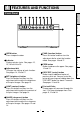
Front Panel
OPEN button
Press to open the door.
Indicator
Displays printer status. See pages 12,
15, 16 and 18 to 23.
Adjustment dial
Changes the settings of each function.
See pages 14, 15 and 17.
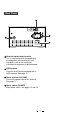
BRT (brightness) button
Press this button and then turn the
adjustment dial to adjust the brightness
of the print images. See page 14.
CONT (contrast) button
Press this button and then turn the
adjustment dial to adjust the contrast of
the print images. See page 14.
SHARP (sharpness) button
Press this button and then turn the
adjustment dial to adjust the sharpness
of the print images. See pages 12 and
14.
FUNC (function) button
Press this button and then turn the
adjustment dial to select the function
mode. See pages 16 and 17.
FEED button
Button to advance the paper. See pages
12 and 13.
COPY/RST (restart) button
Button to print additional copies of
previous print-out. You can restart the
printer by pressing and holding down the
COPY/RST button for about 2 seconds.
See pages 12 and 16.
Print exit/Cutter
Printed paper will come out through this
slot. / Cut the printed paper here. See
pages 9, 12 and 24.
4
FEATURES AND FUNCTIONS