
Instruction manual

9
FRANÇAIS DEUTSCHITALIANO
NEDERLANDS
ESPAÑOL ENGLISH
Moisture, fi ngerprints or dust on the
paper surface may cause a noise
at printing or deterioration in print
quality. Follow the procedure to
prevent fi ngerprint or dust on the
paper surface.
Note: The printing surface is the outside.
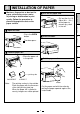
Place the paper with the thermsen-
sitive side (printing side) up.
When the paper roll is placed in-
versely, images can not be printed.
•
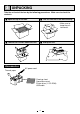
Press the OPEN
button.
The door opens.
printing side
• Place the paper roll
in the printer.
Load the paper roll.
Open the door.
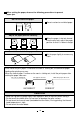
• Pull out the fi rst 15-
20cm (6 in. - 9 in.)
of the paper to
remove any slack
in the roll.
Pull out the paper end.
Close the door.
Cut the paper end.
•
Cut the paper end with the cutter by
pulling the paper upwards against the
cutter blade.
CORRECT
INCORRECT
cutter
5
INSTALLATION OF PAPER