
Instruction manual

10
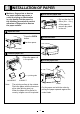
• Keep the high-density paper away from fi ngerprint, dust or moisture when storing it.
• Do not touch the rubber roller. Do not stain or damage the roller surface.
• Do not touch the thermal head (located behind the cutter). When printing, the thermal
head is heated to high temperature.
• Do not touch the cutter blade.
CAUTION
Do not use defective paper.
Do not use bent or wrinkled paper.
When the paper is fed out skewed
from the print exit, adjust the paper
position so that it is fed out straight.
Do not allow slack in the paper roll.
Set the paper tightly to remove any
slack.
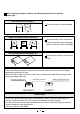
If the side of the print paper is uneven or the core is sticking out, the amount of paper
feeding after printing may vary.
When the side of paper is uneven or the core is sticking out, install the print paper after
making the paper side even.
The core is sticking out.
The paper is uneven.
Make the paper side even.
INCORRECT
CORRECT
Adjust the paper position correctly.
When setting the paper, observe the following precautions to prevent
paper jam.