
Quick Start Guide
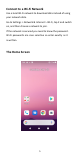
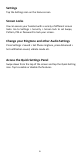
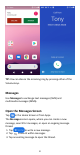
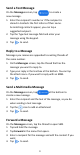
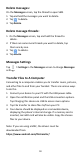


Table Of Contents
- Insert SIM card & memory card
- Key Functions
- Charge your Battery
- Volume Control
- Setting Up for the First Time
- Connect to a Wi-Fi Network
- The Home Screen
- Screen Locks
- Access the Quick Settings Panel
- Swipe down from the top of the screen and tap the
- Delete messages:
- Delete message threads:
- Messages Settings
- Transfer Files to A Computer
- Connecting to a computer enables you to transfer m
- 1.Connect your device to your PC with the USB power
- 2.Open the notification panel and the USB connection
- 3.Tap File transfer to share files to/from your PC.
- 4.Your device should be displayed as a removable dev
- Google, Android, Google Play and other marks are t
13
humming, or whining noise. Some hearing devices are more
immune than others to this interference noise, and phones also
vary in the amount of interference they generate. If your
hearing device happens to be vulnerable to interference, you
may not be able to use a rated phone successfully.
CAUTION:
Changes or modifications not expressly approved by the
manufacturer could void the user’s authority to operate the
equipment.
The antenna(s) used for this transmitter must not be
co-located or operating in conjunction with any other antenna
or transmitter.
NOTE:
This equipment has been tested and found to comply with the
limits for a Class B digital device, pursuant to part 15 of the
FCC Rules.
These limits are designed to provide reasonable protection
against harmful interference in a residential installation. This
equipment generates, uses and can radiate radio frequency
energy and, if not installed and used in accordance with the
instructions, may cause harmful interference to radio
communications. However, there is no guarantee that
interference will not occur in a particular installation. If this
equipment does cause harmful interference to radio or
television reception, which can be determined by turning the