
Quick Start Guide
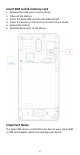
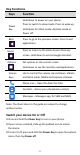
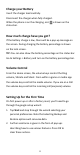
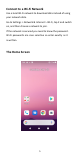
Table Of Contents
- Insert SIM card & memory card
- Key Functions
- Charge your Battery
- Volume Control
- Setting Up for the First Time
- Connect to a Wi-Fi Network
- The Home Screen
- Screen Locks
- Access the Quick Settings Panel
- Swipe down from the top of the screen and tap the
- Delete messages:
- Delete message threads:
- Messages Settings
- Transfer Files to A Computer
- Connecting to a computer enables you to transfer m
- 1.Connect your device to your PC with the USB power
- 2.Open the notification panel and the USB connection
- 3.Tap File transfer to share files to/from your PC.
- 4.Your device should be displayed as a removable dev
- Google, Android, Google Play and other marks are t

5
Connect to a Wi-Fi Network
Use a local Wi-Fi network to download data instead of using
your network data.
Go to Settings > Network & Internet > Wi-Fi, tap it and switch
on, and then choose a network to join.
If the network is secured you need to know the password.
Wi-Fi passwords are case sensitive so enter exactly as it
is written.
The Home Screen