
Quick Start Guide
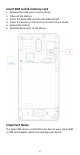
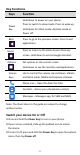
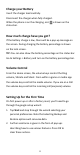
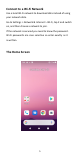
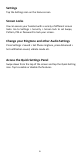
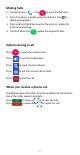
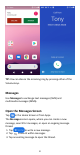
Table Of Contents
- Insert SIM card & memory card
- Key Functions
- Charge your Battery
- Volume Control
- Setting Up for the First Time
- Connect to a Wi-Fi Network
- The Home Screen
- Screen Locks
- Access the Quick Settings Panel
- Swipe down from the top of the screen and tap the
- Delete messages:
- Delete message threads:
- Messages Settings
- Transfer Files to A Computer
- Connecting to a computer enables you to transfer m
- 1.Connect your device to your PC with the USB power
- 2.Open the notification panel and the USB connection
- 3.Tap File transfer to share files to/from your PC.
- 4.Your device should be displayed as a removable dev
- Google, Android, Google Play and other marks are t

9
Send a Text Message
On the Messages screen, tap to create a
new message.
1. Enter the recipient’s number or if the recipient is
stored in Contacts the first letters of their name.
As matching contacts appear, you can tap a
suggested recipient.
2. Tap the Type text message field and enter your
message using the keypad.
3. Tap to send.
Reply to a Message
Messages you receive are appended to existing threads of
the same number.
1. On the Messages screen, tap the thread that has the
message you want to reply to.
2. Type your reply in the text box at the bottom. You can tap
the attach icon + if you want to reply with an MMS.
3. Tap to send.
Send a Multimedia Message
On the Messages screen, tap at the bottom to
create a new message.
1. Enter the recipient and the text of the message, as you do
when sending a text message.
2. Tap the icon to add an attachment
3. Tap to send.
Forward a Message
On the Messages screen, tap the thread to open SMS
1. Tap and hold the message.
2. Tap Forward in the menu that opens.
3. Enter a recipient for the message and edit the content if you
want.
4. Tap to send.