
User's Guide
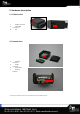
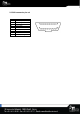
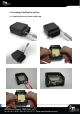
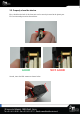
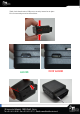


3.3. Install the OBD Dongle
Connect the OBD Dongle on your vehicle OBD connector.
Note : The USB port is not intended to be used during driving operation.
The USB is only used for flashing and debug purpose via USB key or computer.
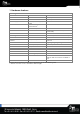
4. LED sequences
The Dongle has a two-coloured LED, green and red.
When both colours are brightened, you can see an orange light.
Green LED
Red LED
Sequence
Meaning
Sequence
Meaning
Dongle OFF
OFF
No Modem
/No GNSS
3 times (50ms ON/100ms OFF)
3550ms OFF
Ext. Power/Run
ON
No Modem
/Fix GNSS
2 times (50ms ON/100ms OFF)
3700ms OFF
Modem OK
/No GNSS
1 time (50ms ON/100ms OFF)
3850ms OFF
Modem OK
/Fix GNSS
2000ms ON
2000ms OFF
Shutdown/Hibern
ate
30ms ON / 1 s OFF
Idle/Sleep
30ms ON / 1 s OFF
5. Support
For all questions not related in this installation guide, please contact the support team by
email at support@mobile-devices.fr