
User's Manual



5
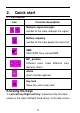
press the left soft key + the red key to lock or unlock the
keypad.
2.Green key: Press the key to send the USSD call.
3. Red key: idle screen, press the key to lock keypad,
Others screen press the key to back home screen.
4. Print key: press the key
to quickly enter the print
interface.
5. Fn Keys: Press the key can open/close the navigation
key on the alphanumeric keyboard.
6. 0-9 alphanumeric keys: Press corresponding keys to
input numbers when dialing or numbers and characters
when editing.
7.
*(Star) Key: Press in standby to input “*” character;
long press switch +/P/W to input.
8. # Key: Press in standby to input “#” character; long
press from standby to activate or deactivate silent mode.
9. Power on/off Key: Long press the key to power on or
power off.
10. O key: press the key to confirm in the any interface.
2.2 Install SIM card
This terminal supports two GSM SIM cards,Find SIM
card’s groove in the back of the terminal and slide it
completely there. During installation, please make sure
the chip is facing downwards and pay attention to slot
direction.
Note
:
1.Keep SIM card out of children’s touch.