
User guide



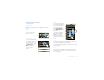
Table Of Contents
- Congratulations
- Your phone
- Contents
- Let’s go
- Touchscreen & keys
- Home screen
- Calls
- Contacts
- Text entry
- Tips & tricks
- Digital living
- Photos & videos
- Music
- YouTube™
- Messaging
- Social networking
- Web
- Personalize
- Maps
- Latitude
- Apps for all
- Bluetooth® wireless
- Wi-Fi®
- Memory card & file management
- Tools
- Management
- Security
- Troubleshooting
- Safety, Regulatory & Legal

7Touchscreen & keys
Adjust volume
Press the volume keys to
change the ring volume (in
the home screen), or the
earpiece volume (during a
call).
Rotate the screen
When you rotate the phone 90 degrees
counterclockwise, the touchscreen can rotate to stay
right-side up:
Find it: Menu > Settings > Display
> Auto-rotate screen
Quick tips
If ever you’re not sure what to do next, try one of
these:
To. ..
Get the details—Open a
text message, see details
for a contact, or open items
in other lists.
Touch the message,
contact, or item.
See screen menu—Open a
menu for the current
screen.
Touch Menu
Volume Keys
See item options—Open
an options menu (if
available) for an item on the
screen.
Touch & hold the
item.
Start again—Go back to
the home screen.
Touch Home
Wake up your
phone—Turn on a sleeping
touchscreen.
Press Power or
open the phone.
To...