
User manual


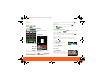
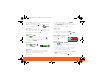
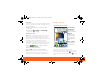
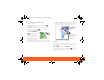
Table Of Contents
- Your Phone
- Contents
- Device Setup
- Calls
- Home Screen
- Keys
- Text Entry
- Voice Input & Search
- Ringtones & Settings
- Synchronize
- Contacts
- Social Networking
- Email & Text Messages
- Tools
- Photos & Videos
- Apps & Updates
- Location Apps (GPS)
- AT&T Features & Services
- Web
- Music Player & Radio
- Wi-Fi® & Bluetooth® Connections
- Memory Card & USB
- Security
- Icons & Battery Life
- Troubleshooting
- Safety, Regulatory & Legal
- Battery Use & Safety
- Battery Charging
- SAR (IEEE)
- WHO Information
- EU Conformance
- FCC Notice
- Industry Canada Notice
- GPS & AGPS
- Navigation
- Driving Safety
- Privacy & Data Security
- Use & Care
- Recycling
- Perchlorate Label
- Hearing Aid Compatibility
- Software Copyright Notice
- Content Copyright
- OSS Information
- Export Law
- Registration
- Warranty

Calls4
Calls
Quick Start: Calls
Find it: Dialer
To open your Recent or Frequent call lists, open
the dialer and touch the tabs at the top.
During a call, touch Menu to choose Hold, New
call, Use Bluetooth, or Voice Quality. When the
GHI
ABC DEF
MNO
TUVPQRS WXY
*
+
#
4
123
6
8
7
9
0
5
JKL
Call
Dialer
Recent Frequent
Active call ( 00:12 )
Alex Pico
Mobile (555) 555-2505
Just found $100 on the street! Drinks on
me tonight!
End call
Mute SpeakerBluetooth
Call Timer
End Call
Dial Pad
Call Lists
Touch a tab to open a
list
Contacts Voice Dial
touchscreen goes dark, you can press Power to
wake it up.
Tip: During a call, you can touch Home or
Back to hide the call display. To reopen it,
touch Dialer.
Make & Answer Calls
To make a call, touch Dialer, enter a number,
then touch Call.
When you enter a number to dial, touch Menu to
add a pause (pauses two seconds), or wait (waits for
your confirmation).
Tip: To enter the international dialing code, touch
and hold . To add a pause or wait after numbers,
press Menu .
To answer a call,
drag Answer to the right
(when your phone is
unlocked, Answer is just a
touch button).
End Calls
Touch End call.
Note: When you hold your
phone to your ear, the display
goes dark to avoid accidental
Stretch to
Answer
Ignore by pressing Lock button
End call
Mute SpeakerBluetooth
XXXX433a.fm.fm Page 4 Monday, October 4, 2010 10:56 AM