
User manual


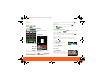
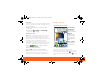
Table Of Contents
- Your Phone
- Contents
- Device Setup
- Calls
- Home Screen
- Keys
- Text Entry
- Voice Input & Search
- Ringtones & Settings
- Synchronize
- Contacts
- Social Networking
- Email & Text Messages
- Tools
- Photos & Videos
- Apps & Updates
- Location Apps (GPS)
- AT&T Features & Services
- Web
- Music Player & Radio
- Wi-Fi® & Bluetooth® Connections
- Memory Card & USB
- Security
- Icons & Battery Life
- Troubleshooting
- Safety, Regulatory & Legal
- Battery Use & Safety
- Battery Charging
- SAR (IEEE)
- WHO Information
- EU Conformance
- FCC Notice
- Industry Canada Notice
- GPS & AGPS
- Navigation
- Driving Safety
- Privacy & Data Security
- Use & Care
- Recycling
- Perchlorate Label
- Hearing Aid Compatibility
- Software Copyright Notice
- Content Copyright
- OSS Information
- Export Law
- Registration
- Warranty

Home Screen 7
TTY Mode
Your phone can use an optional teletypewriter (TTY)
device, for people who are hard of hearing or have a
speech impairment.
1. Plug the TTY device into the phone’s headset
connector.
2. Touch Menu > Settings > Call settings >
and choose a TTY setting.
Emergency Calls
Note: Your service provider programs one or more
emergency phone numbers (such as 911 or 112)
that you can call under any circumstances, even
when your phone is locked. Emergency numbers vary
by country. Your pre-programmed emergency
number(s) may not work in all locations, and
sometimes an emergency call cannot be placed due
to network, environmental, or interference issues.
1. Touch Dialer (if your phone is locked,
touch Emergency Call).
2. Enter the emergency number.
3. Touch Call to call the emergency number.
Note: Your mobile device can use GPS and AGPS
signals to help emergency services find you. See
”GPS & AGPS” in your legal and safety information.
Home Screen
Quick Start: Home Screen
The home screen gives you all your latest
information in one place. It’s what you see when you
turn on the phone or touch Home from a menu.
If your screen goes to sleep, press Power to wake
it up.
AT&T
10 minutes ago
Lisa Jones
My company is sponsoring the
9
Text Messag BrowserMarket
T
ex
t
11:35
3G
Widgets
Touch to open
Touch & hold to
move items (or
show options in
lists)
Open the app menu
Drag or flick to
open panels (or
scroll in lists)
Phone Status
Notifications
Flick this bar
down for details.
XXXX433a.fm.fm Page 7 Monday, October 4, 2010 10:56 AM