
User's Guide

3
CONTENTS
5 About MP710
6 Main Specifications
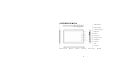
7 Exterior of MP710
8 Accessories
9 Basic Operations
10 Charging
11 Turning On/Off
12 Unlocking The Screen
13 Buttons
14 Using Touch Screen
15 Moving Files from PC to MP710
17 Downloading Applications
19 USB On-The-Go (OTG)
20 Home Screens
21 Adding Widgets, Shorcuts and Folders
22 Changing your Wallpaper
22 Moving Icons
22 Removing Icons
23 Application Screens
25 Status Bar
27 System Settings
29 Wireless and Network
30 Language and Keyboard
31 Applications
33 Changing Input Method
34 Factory Reset