
User Guide



4.12
Printing
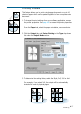
3. Select the Muratec F-110.
4. Click the right mouse button and select Properties to
open the properties window.
Cancelling a Print Job
There are two ways to cancel a print job:
• If your print job has not started to print, cancel from the print spooler
in Windows 95, 98, Me, NT 4.0, 2000 or XP.
• If your print job is currently printing, press STOP twice on the front
panel of your printer.
CAUTION: If a fax job is currently being transmitted or received, this
procedure will also clear it.
Notes:
• Most Windows applications will override the settings you specified
in the printer driver. Change all print settings in the software
application first, and any remaining settings with the printer driver.
• The settings you change here remain in effect while you are
using the current program. To make your changes
permanent, make them in the Printers folder as follows:
1. Click the Windows Start button.
2. Select Settings, then Printers to open the Printers window.