
User`s guide




11 | SPECTRAVIEW II - USER’S GUIDE
2
Dialogs, Settings and Menus
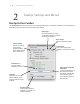
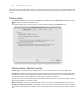
Main SpectraView II window
The SpectraView II window shows the current settings and status of the display calibration. All of the features of
SpectraView are accessed from this window and the menus.
Edit Target
Opens the Calibration Target
Conguration dialog box used to
modify Target settings.
Open Previous Monitor
Calibration
Previous calibrations can
be loaded and viewed.
The display settings and
ICC/ColorSync prole
for the display will be set
automatically.
Display listbox
Selects which display to
calibrate if more than one
display is present.
Targets listbox
Selects an existing
Target setting.
Targets that have
been calibrated have
green check mark.
Calibrate
Calibrates the currently
selected display to the
currently selected Target
Settings.
Calibration On
Turns the display
calibration on or off.
Open Target
Opens a Calibration Target
le.
Save Target
Saves the current Target
Settings to a Calibration Target
le.