
User`s guide


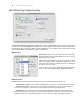

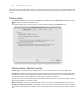
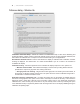
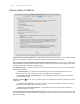

Preferences dialog - ICC Prole tab
20 | SPECTRAVIEW II - USER’S GUIDE
Generate ICC Prole after calibration - selecting this will automatically generate an ICC/ColorSync monitor
prole after the display is calibrated. This option should be checked for most applications.
Set as Windows Color Management System Monitor Prole (ÿ Windows version only) - selecting this
will automatically associate the generated ICC monitor prole with the Windows Color Management System.
This option should be checked for most applications.
ICC Prole le name - selects how the ICC Prole le is named when an ICC Prole is generated, for
example after calibration.
Set Automatically - the prole will be automatically given a name and description. This is the
default setting as it is not normally necessary to manually name the prole le.
Prompt for le name and description - a prompt will appear and the le name and description
can be entered manually.
Storage Location ( Mac OS only) - species where the generated ICC/ColorSync proles are stored.
Options are:
Per User of this computer - the prole is stored in the User’s prole folder. Proles in this folder
are typically not accessible from other user accounts.
Shared by all users of this computer - the prole is stored in the shared prole folder that is
accessible by all user accounts.
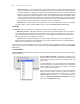
Source of primary color chromaticities for ICC Prole - selects what values are used for the Primary Color
Chromaticities that are stored in the ICC/ColorSync monitor prole. The values are used to describe the color
gamut of the display.
•
•
•
•